
For most of the past decade, “using AI” meant a browser tab and someone else’s servers. In 2026 that’s no longer the default. Open-weight models in the 4–14B range now run genuinely well on an ordinary 16 GB laptop, and a wave of desktop apps has grown up around them — so if your material is confidential (client files, contracts, patient records, financials), running AI on your own machine has gone from an enthusiast hobby to the sensible professional choice.
This guide compares the six offline AI tools we’d actually recommend for Windows and macOS in 2026, what each is genuinely best at, and how to choose.
Short on time? The picks by use case
- Professionals working with confidential documents (legal, healthcare, finance, HR) — Tholos AI
- Exploring open models with a friendly GUI — LM Studio
- Developers building on local AI — Ollama
- Free, simple local chat — GPT4All or Jan
- DIY document-chat workspaces — AnythingLLM
What “offline AI software” should actually mean
Plenty of apps advertise “private AI” while quietly routing your text through a hosted API. For this list, a tool only qualifies if inference runs on your hardware: the model lives on your disk, the processing happens on your CPU/GPU, and the software keeps working with the network cable unplugged. Some tools here can also connect to cloud models as an option — that’s fine, as long as local-only operation is real and not a demo mode.
Beyond that baseline, the tools differ on a spectrum worth understanding before you choose: at one end are model runners — engines and chat windows that let you download and talk to any open model, with everything else left to you. At the other end are finished applications — tools that use local models to do specific jobs (summarize this contract, redact this file, transcribe this meeting) without you building anything. Neither end is “better”; they’re for different people.
How we compared them
- Truly local processing — and whether you can verify it, not just trust it.
- Document workflows out of the box — Q&A with citations, summarization, redaction, transcription — versus raw chat.
- Ease for non-technical users — can a lawyer or clinician be productive in ten minutes?
- Model management — sensible defaults for your hardware, not a wall of quantization jargon.
- Platforms, support, and cost.
The tools, ranked by what they’re best at
1. Tholos AI — best for professionals working with confidential documents
Windows 10/11, macOS 13+ · from $79/year · 14-day free trial, no account
This is our own tool, so weigh that accordingly. Tholos AI sits at the “finished application” end of the spectrum: instead of a chat box and a model library, you get a dozen-plus built-in workflows — document Q&A with answers cited to the source page, summarization, PII redaction with a review step, contract review with risk flags, meeting transcription with speaker labels, translation, entity extraction to spreadsheets, a persistent knowledge base, and batch processing across folders.
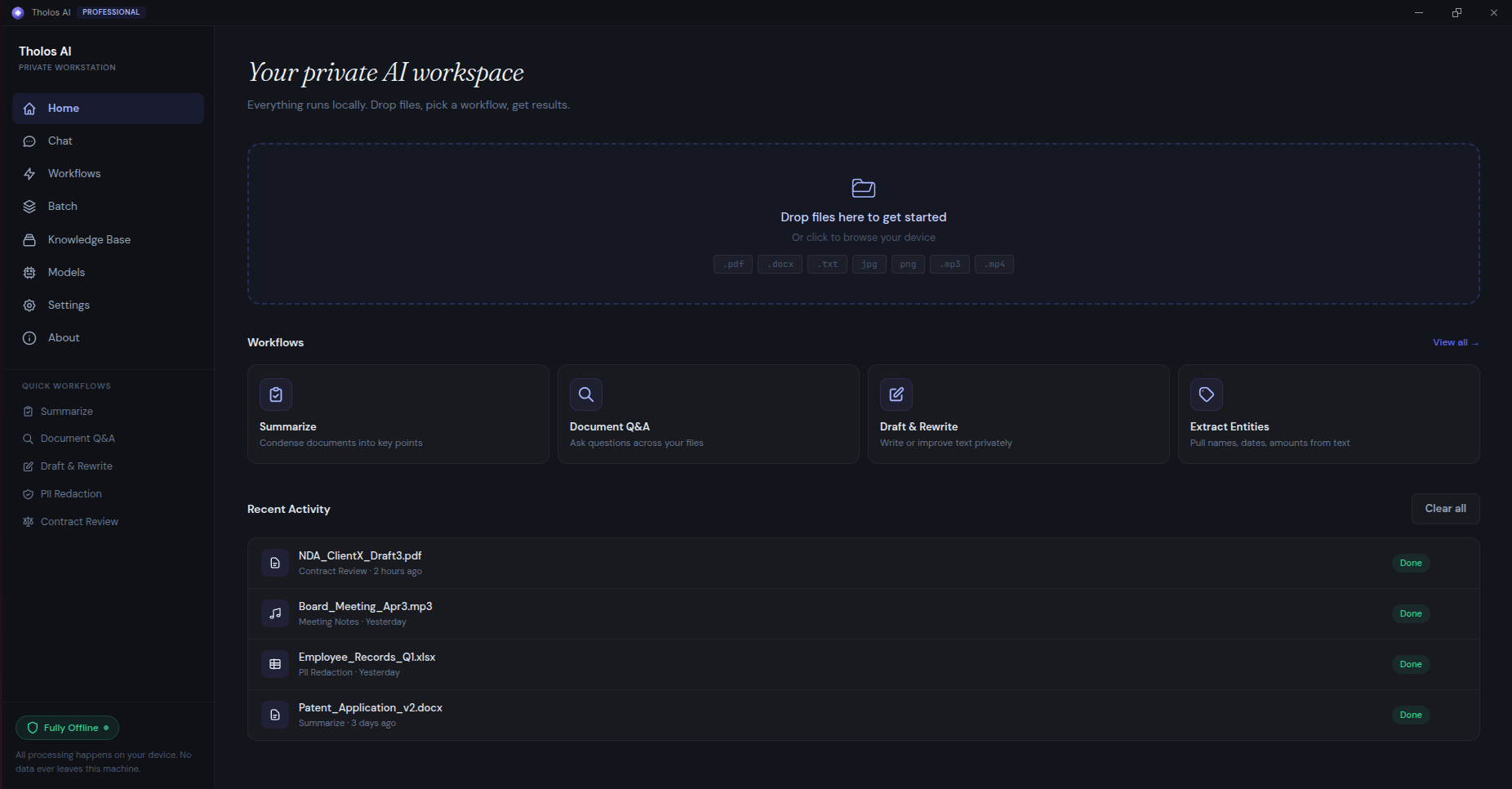
The privacy posture is the differentiator: no telemetry, no account, one optional catalog check you can disable, and a “Fully Offline” badge during processing. It’s built so your IT or compliance team can verify zero data egress themselves rather than take a policy’s word for it — including fully air-gapped installs.
Where it shines
- Complete workflows — no prompt engineering or setup; drop a file, get a cited answer, a redacted PDF, a transcript.
- Curated model catalog in plain tiers matched to your hardware (with bring-your-own GGUF if you want it).
- Privacy you can demonstrate to a client, regulator, or IT department.
Trade-offs
- Paid after the 14-day trial — every other tool on this list is free.
- Windows and macOS only; no Linux build.
- Deliberately curated rather than infinitely tweakable — if you want to swap inference engines and tune every sampler knob, a model runner will make you happier.
2. LM Studio — best for exploring open models with a GUI
Windows, macOS, Linux · free
LM Studio is the most polished way to browse the open-model world: search Hugging Face from inside the app, download a model with one click, chat with it, and serve it to other apps through a local OpenAI-compatible server. On Apple Silicon it supports Apple’s MLX engine, which makes Mac inference notably quick.
Where it shines
- The best model discovery-and-download experience of any desktop tool.
- Attach documents for basic local RAG chat; run a local API server for other apps.
- Free, actively developed, cross-platform.
Trade-offs
- It’s a model tool, not a task tool — workflows like redaction or contract review are yours to assemble.
- The app itself is closed-source, which matters to some privacy-minded users.
- The wall of settings can overwhelm non-technical users.
3. Ollama — best for developers building on local AI
Windows, macOS, Linux · free, open source
Ollama is the de-facto standard engine for local models in the developer world: ollama pull a model, get an API, and plug it into a vast ecosystem of frontends, editors, and frameworks that all speak Ollama. A simple desktop app now exists, but the heart of it is still the engine and API.
Where it shines
- Effortless model management from the command line; huge model library.
- The broadest integration ecosystem of any local AI tool.
- Open source, scriptable, runs headless on servers.
Trade-offs
- Developer-oriented by design — non-technical users will want one of the GUI tools instead.
- Document workflows come from third-party frontends you choose and configure yourself.
4. GPT4All — best free, simple local chat
Windows, macOS, Linux · free, open source
Nomic’s GPT4All is one of the longest-running local AI apps: a straightforward, open-source chat client with a built-in model catalog and a LocalDocs feature that lets the model draw on folders of your files. It runs comfortably on modest hardware.
Where it shines
- Genuinely simple — install, pick a model, chat.
- LocalDocs gives you basic chat-with-your-files without any setup ceremony.
- Light on resources; fine on older machines.
Trade-offs
- Chat-centric — no structured workflows, exports, or review steps.
- Less polish and slower model-catalog churn than LM Studio.
5. Jan — best open-source ChatGPT-style app
Windows, macOS, Linux · free, open source
Jan aims to be the open-source ChatGPT replacement: a clean, familiar chat interface over local models, with the option to connect cloud APIs when you choose, and an extension system for adding capabilities.
Where it shines
- The nicest “it just feels like ChatGPT, but local” experience among the open-source apps.
- Fully open source, with local-first defaults.
Trade-offs
- Chat-first; document tooling is thin compared to RAG-focused tools.
- A younger project — expect rougher edges than the tools above.
6. AnythingLLM — best for DIY document workspaces
Windows, macOS, Linux, self-hosted · free, open source
AnythingLLM organizes local AI around workspaces: drop documents into a workspace, embed them, and chat against that corpus — with agents and connectors on top. It can use its own built-in engine or sit on Ollama/LM Studio, and runs as a desktop app or a self-hosted server for a small team.
Where it shines
- The most capable free RAG setup — per-project workspaces over your own documents.
- Flexible: desktop or Docker, local or remote models, agents and integrations.
Trade-offs
- More concepts to configure (embedders, vector stores, model endpoints) — it rewards technical comfort.
- Output quality depends heavily on the models and settings you choose.
Side by side
| Tool | Best for | Open source | Document workflows built in | Non-technical friendly | Price |
|---|---|---|---|---|---|
| Tholos AI | Confidential professional documents | No (open-weight models) | Yes — a dozen-plus, with review steps & exports | Yes | From $79/yr; 14-day trial |
| LM Studio | Exploring open models | No | Basic (chat with files) | Moderate | Free |
| Ollama | Developers & integrations | Yes | No (via third-party frontends) | Developer-oriented | Free |
| GPT4All | Simple local chat | Yes | Basic (LocalDocs) | Yes | Free |
| Jan | Open-source ChatGPT feel | Yes | Basic | Yes | Free |
| AnythingLLM | DIY RAG workspaces | Yes | Yes (workspaces you configure) | Moderate | Free |
How to choose
- Your documents are confidential and your time is billable. You want finished workflows, verifiable privacy, and support — that’s the case Tholos AI is built for. Try the live demo before installing anything.
- You enjoy the model world itself. New releases, quantizations, benchmarks — LM Studio first, Ollama when you start scripting.
- You’re building software. Ollama, full stop — then pick frontends as needed.
- You want free and simple. GPT4All or Jan will get you a private chat assistant in ten minutes.
- You want free document Q&A and don’t mind assembling it. AnythingLLM (optionally on Ollama) is the strongest no-cost RAG stack.
What hardware do you need?
Less than you’d think. 16 GB of RAM is the practical floor and the sweet spot — enough to run a Balanced-class 7–8B model comfortably on CPU, and Apple Silicon Macs are particularly good at this thanks to unified memory. A discrete GPU makes everything faster but isn’t required by any tool on this list. For the full picture, see our guides to hardware for running local AI and choosing the right model.
Frequently asked questions
Is offline AI as good as ChatGPT?
For the hardest open-ended reasoning, frontier cloud models still lead. But for the work most professionals actually do with documents — summarization, grounded Q&A, extraction, translation, transcription — current 7–14B open models are more than capable. And for confidential material the real comparison isn’t quality-versus-quality; it’s usable versus not allowed at all. See our honest cloud-vs-offline comparison.
Is offline AI really private?
Architecturally, yes: if the model runs on your machine and the app makes no network calls, there is nothing to leak or subpoena. The key word is verify — watch the app in a network monitor, or block it at the firewall and confirm it keeps working. Any honest local-AI vendor should survive that test.
Are all of these free?
All except Tholos AI. The free tools give you an engine and a chat window — excellent ones. You’re paying Tholos AI for the finished car: built-in professional workflows, a curated model catalog, a review-step approach to risky operations like redaction, and support. If you don’t need those, use the free tools with our blessing.
Can I run these fully air-gapped?
Every tool here works offline once models are installed. Tholos AI additionally supports a deliberate air-gap path — installer and models moved over by USB, no internet ever — documented for IT in our verification guide.
The bottom line
The local AI ecosystem in 2026 is good enough that the question is no longer whether you can run AI privately — it’s which tool matches your relationship with the technology. Tinkerers and developers are spoiled by LM Studio and Ollama. Budget-minded users have real choices in GPT4All, Jan, and AnythingLLM. And professionals who just need confidential document work done — with privacy they can prove — are exactly who we built Tholos AI for.
Working with documents you can’t put in the cloud?
Tholos AI runs every workflow on your own machine. Try it free for 14 days — or play with the live demo in your browser first.